
How Hero11 Fantasy Works: Predictions and Match Cards
Use this walkthrough to understand the Fantasy screen, read the rules for the item you open, and find your existing entries. For a quick module overview, use the Fantasy section guide.
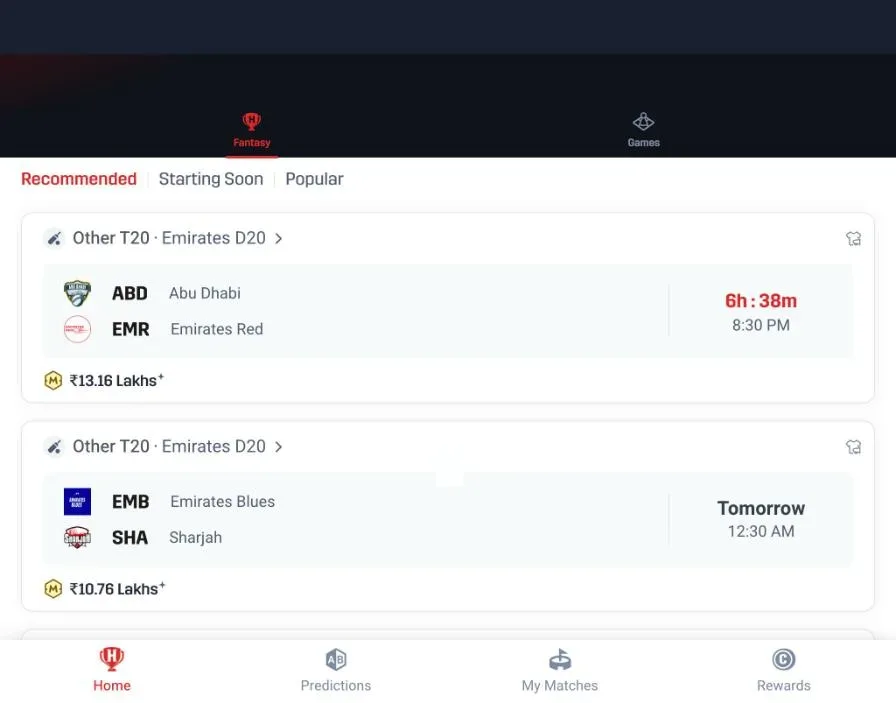
Question or card → Rules → My Matches
On this page
Quick answer
Open Fantasy in the Hero11 app or website. Suggested Predictions and match cards are different entry points: inspect the selected item and its current rules before making a choice. Use Predictions or My Matches to find the corresponding records after signing in.
1. Open the Fantasy section
Select Fantasy from the top navigation in your existing Hero11 app or on the website. The button on this page opens that website section. If an account prompt appears, use your existing Hero11 login. You can open the website without installing another APK.
2. Read a Suggested Prediction
Suggested Predictions show a question with YES and NO choices. Read the full question, the event it refers to, the closing condition and any rules or entry terms shown after opening it. The label on a card alone does not explain how the result will be settled.
3. Understand a match card
| On the card | What it helps you identify |
|---|---|
| Sport and competition | The match category and competition you are viewing. |
| Teams and start time | Which fixture is listed and when it is scheduled. |
| Displayed contest information | Open the item to read current eligibility, entry conditions and result rules. Do not infer them from another match. |
The visible Fantasy screen contains Cricket, Football and Kabaddi tabs. This guide does not assume every format uses team selection, a captain or the same scoring system; use the rules displayed for your selected item.
4. Find your existing predictions and matches
Use Predictions or My Matches in the Fantasy navigation while signed in to the account used for the entry. Match the event and status shown there. If a record is missing or a result needs clarification, keep its reference and contact Hero11 Customer Service.
If the section or a record will not load
Check your connection, return to the Fantasy tab and confirm you are in the correct account. Do not repeatedly submit an entry while its status is unclear. For a sign-in issue use login help; for a payment record use transaction status help.
Frequently asked questions
Do I need to install an APK to open Hero11 Fantasy?
You can open the Fantasy section on the Hero11 website. If you already use the app, open its Fantasy tab. Sign in when an account prompt appears.
Are predictions and match cards the same thing?
No. Suggested Predictions show questions with YES and NO choices; match cards identify fixtures and lead to their available details. Read the current rules for the item you open.
Where do I find an existing Fantasy entry?
Sign in to the account used for the entry and check Predictions or My Matches in the Fantasy navigation.
Open the Fantasy screen
The website opens directly to Fantasy. Use the current rules and your existing account when a login is required.
Open Hero11 FantasyReferences
hero11.games is an independent information guide, not the Hero11 operator. Download and platform buttons open the Hero11 site (hero11-in.hero11apex.com) through tracked partner links. This site does not host the APK, create accounts or handle payments. 18+ · Local eligibility and responsible use
Editorial update: · hero11.games Editorial Team