
Hero11 Login: How to Sign In and Fix Login Problems
Return to your Hero11 account through the app or website. This guide covers the fantasy sports and gaming service; GoPro HERO11 camera help is a separate topic.
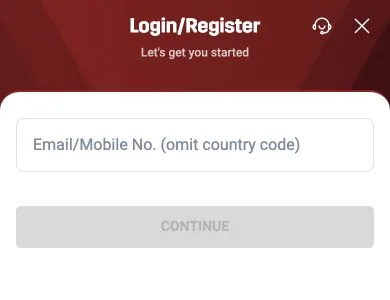
LOGIN/REGISTER → Email/Mobile → CONTINUE
On this page
Quick answer
Tap the green LOGIN/REGISTER button at the top of the Hero11 app or website. Enter your email address, or your 10-digit mobile number without +91, in the one field and tap CONTINUE, then complete the step Hero11 shows next. New users register through the same screen.
How to sign in to your existing account
Open Hero11
Use your installed app, or open the Hero11 website with the button on this page. You do not need to download the APK just to open the website.
Tap LOGIN/REGISTER
The website opens first. Select LOGIN/REGISTER at the top to open the sign-in form.
Use your existing account details
Enter the email or mobile number linked to your account, omit the country code, and follow the next prompt after CONTINUE.
The Login/Register screen
- Title Login/Register, subtitle “Let’s get you started”.
- One field: Email/Mobile No. (omit country code).
- CONTINUE is grey until the field is filled.
- A headset icon next to the close (×) button — the support entry.
Tap to enlargeWhat to type
| You use | Type | Common mistake |
|---|---|---|
| Mobile number | 10 digits, e.g. 98XXXXXXXX | Adding +91 or a leading 0 |
| The full address | A trailing space or .co instead of .com | |
| Not sure | Try the number first, then your main email | Registering a second account |
New to Hero11? Registration starts here
There is no separate sign-up page — enter a contact you can always reach and follow the prompts after CONTINUE. Use a number or email you will keep: it is how you recover the account later.
Hero11 login not working?
| Problem | What to do |
|---|---|
| CONTINUE stays grey | The field is empty or not valid yet — retype without +91 |
| No code or prompt arrives | Wait a minute, check what you typed and your signal; don’t tap repeatedly |
| LOGIN/REGISTER is missing | You may already be logged in — look for your account at the top |
| An account message or block | Read it and contact Hero11 Customer Service; don’t open a new account to get around it |
Keep your login private
Hero11 support and genuine channels never need your OTP, password or UPI PIN. Anyone who asks — including “customer care numbers” online — is trying to take over the account. See Hero11 Customer Service.
Frequently asked questions
How do I log in to Hero11?
Tap LOGIN/REGISTER, enter your email or your mobile number without +91, tap CONTINUE and complete the next step Hero11 shows.
How do I register on Hero11?
Use the same LOGIN/REGISTER screen. Enter a mobile number or email you will keep, tap CONTINUE and follow the prompts.
Why is the CONTINUE button grey?
The field is empty or the entry isn’t valid yet. Type the 10-digit number without +91, or the full email address.
Is there a separate Hero 11 Fantasy login?
No. One Hero11 login works for Fantasy, Games and Casino on the app and the website.
Continue to your Hero11 account
This opens the Hero11 website. Tap LOGIN/REGISTER at the top, then use your existing email or mobile number.
Open Hero11 to Log InReferences
hero11.games is an independent information guide, not the Hero11 operator. Download and platform buttons open the Hero11 site (hero11-in.hero11apex.com) through tracked partner links. This site does not host the APK, create accounts or handle payments. 18+ · Local eligibility and responsible use
Editorial update: · hero11.games Editorial Team