
Hero11 Ludo: Where to Find It and How to Open It
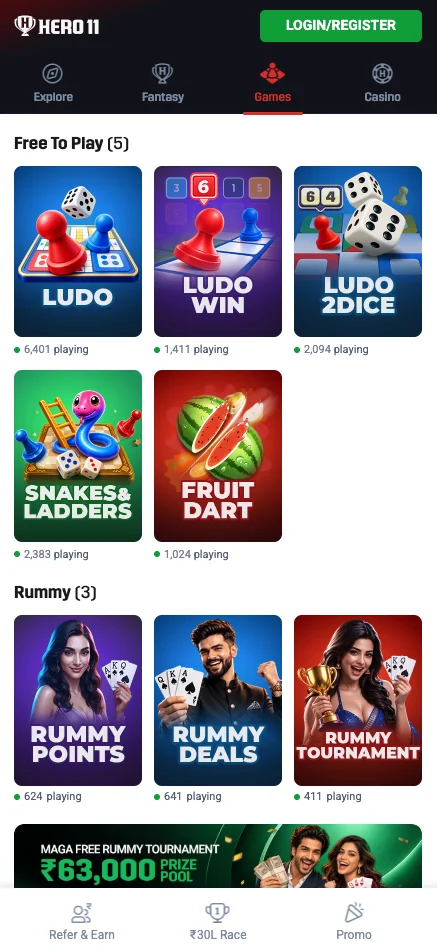
Open the Games tab and look in Free To Play for three distinct titles: Ludo, Ludo Win and Ludo 2dice. Choose the tile you want, then read the rules shown for that title.
On this page
Three Ludo titles to look for



These are separate tiles, not interchangeable rule sets. Snakes & Ladders and Fruit Dart appear in the same Free To Play section, but they are other games, not Ludo variants. Browse the Games overview for other categories.
How to open Ludo in Hero11
Open Hero11 Games
Use the main button to open Games on the website, or tap Games in your existing Hero11 app.
Find Free To Play
Look for the Ludo, Ludo Win or Ludo 2dice tile and open the specific title you want.
Check the title’s current instructions
Read the rules and any entry conditions shown. If asked to sign in, use your existing account. Do not assume timers, scoring or rewards from the tile name.
If you cannot find or open a tile
Return to the Games tab, check your connection and let the list finish loading. The available titles can change. For account prompts use login help; if the game remains unavailable, use Customer Service. A separate APK for each Ludo title is not part of the navigation shown here.
Ludo entry questions
Where is Ludo in Hero11?
Open Games and look in Free To Play for Ludo, Ludo Win and Ludo 2dice. The main button opens Games, where you choose a tile.
Are all five Free To Play titles Ludo games?
No. Ludo, Ludo Win and Ludo 2dice are the three Ludo titles shown. Snakes & Ladders and Fruit Dart are other games in the same section.
hero11.games is an independent information guide, not the Hero11 operator. Download and platform buttons open the Hero11 site (hero11-in.hero11apex.com) through tracked partner links. This site does not host the APK, create accounts or handle payments. 18+ · Local eligibility and responsible use
Editorial update: · hero11.games Editorial Team